A Parts Order can be loaded from a Comma Seperated View (CSV) file from a spreadsheet or from your business system, instead of having to manually type in each part and quantity into the Parts Order Entry screen.
The format of the CSV file is the Ariens Part number in the first column and the quantity in the second column. Only the Part numbers with a valid quantity will be uploaded. Column headings can be used and will be ignored. Below is an example of how the CSV would look in your spreadsheet application (See your business system's help to create a CSV file in this format):
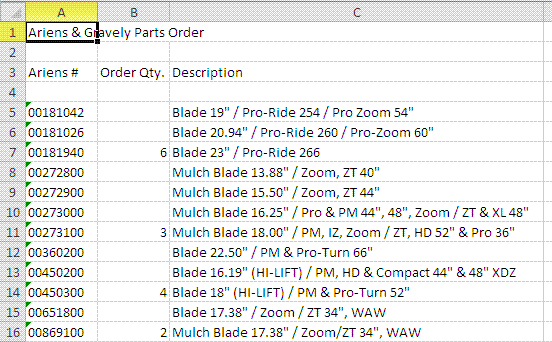
- If the Ariens Part Number is all numeric, the leading zeros are required to be a valid Ariens Part Number. For example 00181042 = correct; 181042 = invalid. You should be able to do this by formatting the column as "Text".
- The Ariens Part Number will be imported into the Parts Order Entry screen, if the Quantity column has a valid number (1-9999).
- Any columns after the Ariens Part Numbers and Quantities are ignored.
- There is a limitation of only 100 Ariens Part Numbers with quantities that can be uploaded, including any parts already entered into the Parts Order Entry screen.
Save the file as a Comma Seperated View (CSV) file to your computer. Next click the Browse... button on the Parts Order CSV File Upload screen. Navigate to the file you just created and select it. Finally click the Upload button to import the CSV file to the Parts Order Entry screen. This could take some time, depending on the number of parts you are ordering.
If this brief help text doesn't answer your question, please contact Customer Service.
_______________________________________________________
© Copyright 2001, Ariens Company. All rights reserved.


